 Flowcraft
Step 1
Describe the shot to the Creative Director
Create a project and say what you want in plain words: the subject, where the video will be posted and the mood. The Director asks about the format first, then writes a video prompt card with the model, settings and cost.
It recommends a model for each job. If you want Kling 3.0 specifically, ask for Kling 3 Pro by name.
For example: “An 8-second vertical ad for black wireless headphones floating over dark water. Use Kling 3 Pro, with sound.”
Tip: Say where it will be posted. Use 9:16 for TikTok, Reels and Shorts, and 16:9 for YouTube.
Step 2
Pick the length, shape and sound
Open the card in the generator. With Kling 3 Pro selected, choose the length (5, 8, 10 or 15 seconds), the shape (16:9, 9:16 or 1:1) and whether to include sound. The cost updates before you press Generate.
Sound costs more
Kling 3.0 creates sound together with the picture, such as ambience and sound effects. In Flowcraft that's 18 credits a second instead of 12. Turn it off if you'll add your own music later.
Step 3
Write the movement in beats
Split the clip into short beats and say what happens in each, for example 0–3 seconds and 3–8 seconds. Then describe the camera, the light and the sound you want.
Put the most important movement first. AI video models don't follow every detail, so the first thing you describe is the one most worth getting right.
Tip: End the prompt with the sound, such as “soft sub-bass swell, quiet ambience”.
Step 4
Start from an image for more control (optional)
Kling 3 Pro in Flowcraft can start from your own image and end on another. Make the still first with an image model, check it, then animate it. An image costs far fewer credits than a video, so fix the look there.
Step 5
Generate, check and download
Press Generate. When the clip is ready, watch it with sound, then download it. If one detail is wrong, change that part of the prompt and generate again, rather than rewriting everything.
Real examples, with the exact prompts
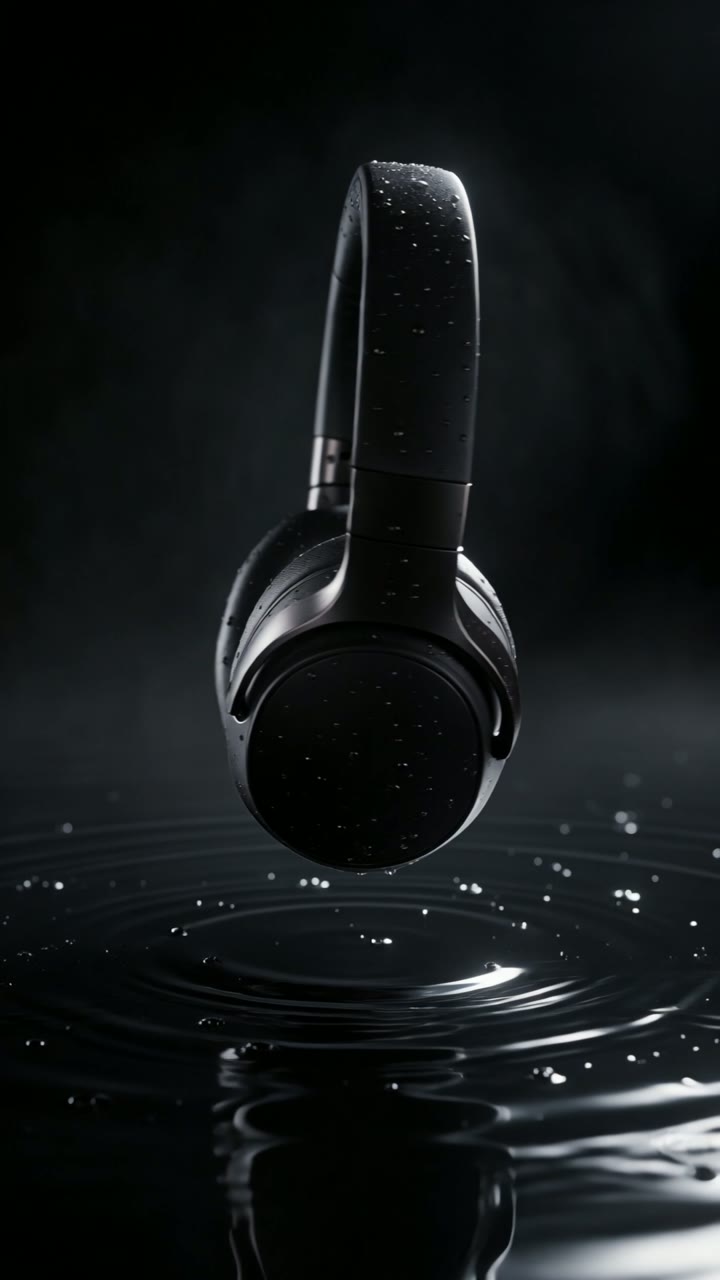
Headphone ad
Kling 3 Pro · 9:16 · 8 seconds · sound on · 144 credits
Premium luxury headphone commercial hero shot. A complete matte-black over-ear wireless headphone, with the full headband, both earcups, brushed gunmetal yokes and leatherette cushions all in frame, hovers just above perfectly still, mirror-flat dark water in a pitch-black studio. Beat one, 0-3 seconds: the headphone slides smoothly in from the left with an eased start, decelerating gracefully to rest centered in the upper two-thirds of the frame. Beat two, 3-8 seconds: it turns slowly and steadily in place like a turntable, with weighty, unhurried motion, no wobble and no jitter. The water stays completely stagnant with no ripples or droplets, holding a clean reflection that mirrors the rotation. Silver rim light traces the whole silhouette while a soft highlight travels across the gunmetal band and matte shell. Locked-off eye-level camera, shallow depth of field, cool silver and black palette. Soft sub-bass swell on the slide, quiet airy ambience.
Kling kept the slow turn, the reflection, the rim light and the sound. It didn't follow everything: the headphones are centred from the start instead of sliding in, and the water has ripples and drops even though the prompt asked for still water. Expect to adjust a detail or two.
Astronaut on Mars
Kling 3 Pro · 16:9 · 5 seconds · sound on · 90 credits
Cinematic sci-fi shot on Mars. An astronaut in a weathered white spacesuit with a gold reflective visor stands at the edge of a lander ramp. Beat one, 0-2 seconds: the astronaut's boot steps down and presses into fine red dust, a small puff of dust lifting around it. Beat two, 2-5 seconds: the astronaut lifts their head toward the horizon as a towering wall of red dust storm rolls in across the plains, the orange sky dimming. Low-angle camera at boot height, slowly rising and tilting up to follow the head. Warm rust and amber palette, hard sunlight fading to haze, realistic film grain. Sound: howling wind building, the crunch of the boot in dust, slow steady breathing inside the helmet.
Kling followed the two beats well: a low shot of the boot stepping off the ramp into red dust, then the camera rises to the helmet as the dust storm rolls in, with wind, footsteps and breathing on the soundtrack. The boot lands in a dent that's already there, and the astronaut ends side-on rather than facing the storm. Five seconds was enough for one clear idea.
What it costs
| Step | Model | Credits |
|---|---|---|
| 5 seconds, with sound (the astronaut clip) | Kling 3 Pro | 90 |
| 8 seconds, with sound (the headphone ad) | Kling 3 Pro | 144 |
| 10 seconds, with sound | Kling 3 Pro | 180 |
| 15 seconds, with sound | Kling 3 Pro | 270 |
| Any length, no sound | Kling 3 Pro | 12 per second |
| 5-second clip with sound | 90 credits |
In Naira, 90 credits is about ₦2,700 on a monthly plan or ₦3,600 with a top-up. Top-ups start at ₦2,000 for 50 credits.
Every card shows the cost before you generate, so you always know what you'll spend.
Questions
What is Kling 3.0?
Kling 3.0 is a family of AI video and image models from Kuaishou. Kling Video 3.0 makes clips up to 15 seconds long, with sound created together with the picture. In Flowcraft it's listed as Kling 3 Pro.
When did Kling 3.0 come out?
Kuaishou announced Kling AI 3.0 on 5 February 2026.
Is Kling 3.0 free?
Not in Flowcraft: each clip spends credits. The free Starter plan includes 5 Creative Director messages a day and 1 free image, so you can plan the shot and get the prompt ready before you pay. For Kling's own free offers, check kling.ai.
Does Kling 3.0 have audio?
Yes. Kling 3.0 can create sound with the video. In Flowcraft you can turn sound on (18 credits a second) or off (12 credits a second).
How much does Kling 3.0 cost in Naira?
In Flowcraft, a 5-second clip with sound is 90 credits: about ₦2,700 on a monthly plan or ₦3,600 with a top-up. A 10-second clip with sound is 180 credits.
Can I pay for Kling AI in Naira?
Yes, through Flowcraft. Plans and credit top-ups are priced in Naira and paid with Paystack.
How long can a Kling 3.0 video be?
5, 8, 10 or 15 seconds in Flowcraft. For a longer video, make several clips and join them in an editor such as CapCut, or try Kling 4, which goes up to 30 seconds.
Should I use Kling 3.0 or Kling 4?
Both are in Flowcraft. Kling 4 is newer, goes up to 30 seconds and can use up to 4 reference images to keep a product or character the same. Kling 3 Pro goes up to 15 seconds. Compare the cost on the card for your settings before you choose.